Use Cases
How organizations use OPA to distribute AI-powered analysis without the cost of server-side processing.
The Cost Problem
Running LLM analysis on the server side is expensive. Every API call to process user data consumes tokens, and costs scale linearly with usage. For complex analytical tasks requiring large context windows, these costs quickly become prohibitive.
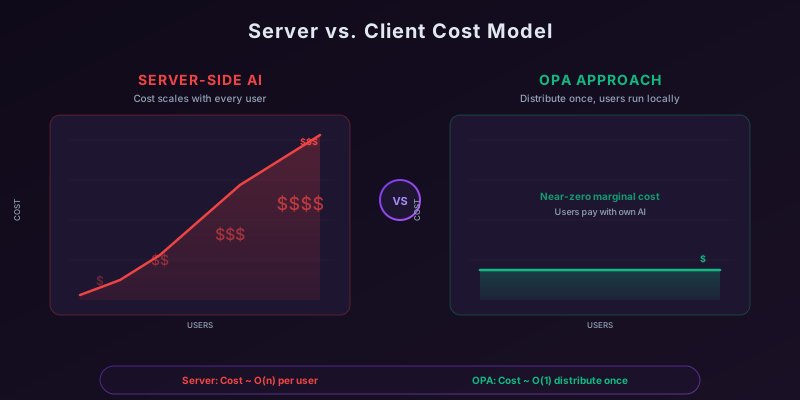
OPA solves this by shifting the computation to the user. Instead of running expensive AI analysis on your servers, you package the data and analysis instructions into an OPA archive. Users download and run it with their own AI agent — using their own API keys, local models, or enterprise AI subscriptions they’re already paying for.
Primary Use Case: Packaged Analysis
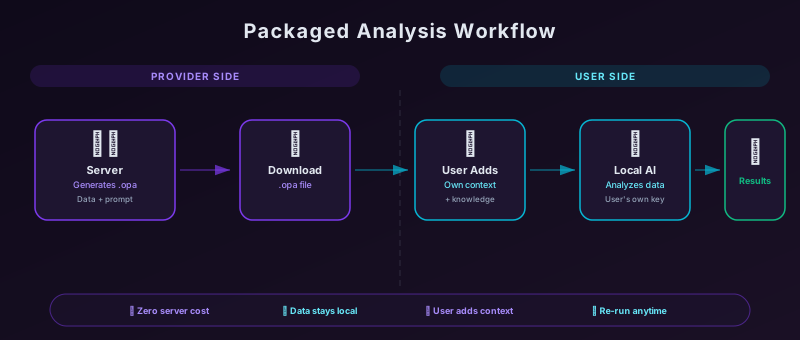
The most compelling use case for OPA is packaging complex data with analysis prompts for client-side execution.
Why This Matters
- Cost efficiency — Server-side LLM processing is expensive; users often have their own AI access
- User context — Users can enrich the analysis with information only they have
- Privacy — Sensitive data never leaves the user’s environment
- Flexibility — Users can re-run analysis with different models or parameters
Example: Hotel Inventory Analysis
Consider a hotel management system with an inventory inspector that shows room availability by type and date. When discrepancies appear — unexpected overbookings, unexplained gaps in availability — the cause isn’t always obvious from the standard reports.
The Challenge
The underlying data is complex:
- Room bookings with various statuses
- Block reservations for groups and events
- Out-of-service periods for maintenance
- Cache states and synchronization data
- Rate overrides and restrictions
A skilled analyst can work through this data to find the root cause, but it’s time-consuming. An LLM could analyze it much faster — but processing this for every user query would be prohibitively expensive.
The OPA Solution
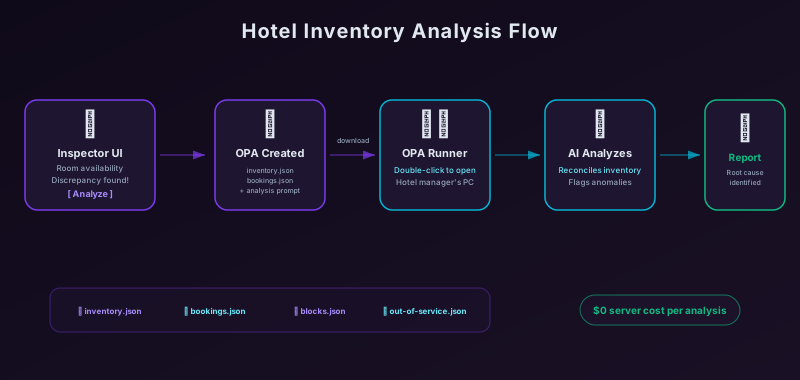
With OPA, the hotel system can:
- Export the context — Generate a comprehensive JSON file with all relevant inventory data
- Bundle the skill — Include a well-crafted analysis prompt that teaches the LLM how to interpret this data
- Package as OPA — Combine data and prompt into a downloadable
.opafile - User executes locally — The hotel manager downloads and runs it with OPA Runner
The user gets a detailed analysis report explaining exactly why a date shows as overbooked, what bookings are contributing, and potential resolutions — all without the hotel system paying for server-side AI processing.
Sample Archive Structure
inventory-analysis-2026-03-15.opa
│
├── META-INF/
│   └── MANIFEST.MF
│
├── prompt.md                    # Analysis skill/instructions
│
└── data/
    ├── INDEX.json
    ├── inventory-snapshot.json  # Current availability state
    ├── bookings.json            # All relevant bookings
    ├── blocks.json              # Group/event blocks
    ├── out-of-service.json      # Maintenance periods
    └── rate-restrictions.json   # Pricing rules
The Analysis Prompt
The prompt.md file contains instructions that turn any capable LLM into a hotel inventory analyst:
You are analyzing hotel inventory data for the Seaside Resort.

The user is investigating availability discrepancies for the date
shown in the inventory snapshot. Your task is to:

1. Identify all factors affecting availability for each room type
2. Reconcile the booking count against available inventory
3. Flag any anomalies (overbookings, orphaned blocks, cache mismatches)
4. Provide a clear explanation of why the numbers appear as they do
5. Suggest corrective actions if discrepancies are found

## Data Files

- `inventory-snapshot.json` — Current availability by room type
- `bookings.json` — Individual reservations affecting this date
- `blocks.json` — Group blocks with pickup counts
- `out-of-service.json` — Rooms unavailable for maintenance
- `rate-restrictions.json` — Booking restrictions that may affect availability

Analyze methodically, showing your work. Present findings in a
structured report with sections for each room type affected.
Other Use Cases
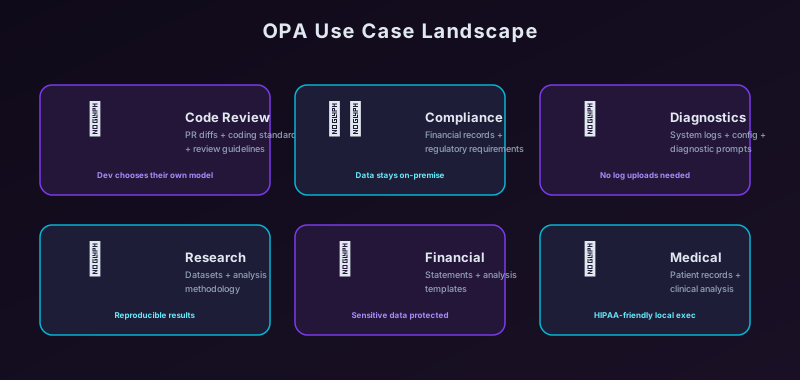
Code Review Packages
Bundle a pull request diff with coding standards and review guidelines. Developers download and run the review with their preferred AI model.
Compliance Audits
Package financial records with regulatory requirements and audit procedures. Auditors run analysis locally, keeping sensitive data on-premise.
Support Diagnostics
Export system logs, configuration, and diagnostic prompts. Support engineers analyze issues without uploading logs to external services.
Research Data Analysis
Share datasets with analysis methodologies. Researchers can reproduce analyses or extend them with their own AI tools.
Benefits Summary
| Benefit | Server-Side AI | OPA Approach |
|---|---|---|
| Cost per analysis | Paid by provider | Paid by user (or free with local models) |
| User context | Limited to what’s sent | User can add their own knowledge |
| Data privacy | Data sent to AI provider | Data stays local |
| Model choice | Provider decides | User decides |
| Offline capability | Requires connectivity | Works with local models |
| Reproducibility | Depends on provider | Archive is self-contained |
Ready to package your own analysis? Check out the language libraries to start generating OPA archives from your application, or read the specification to understand the format in depth.